
Thomson Reuters logo icon.

Thomson Reuters

Thomson Reuters informs the way forward by bringing together the trusted content and technology that people and organizations need to make the right decisions. The company serves professionals across legal, tax, accounting, compliance, government, and media. Its products combine highly specialized software and insights to empower professionals with the data, intelligence, and solutions needed to make informed decisions, and to help institutions in their pursuit of justice, truth, and transparency. Reuters, part of Thomson Reuters, is a world leading provider of trusted journalism and news. For more information, visit thomsonreuters.com.

Interested in Thomson Reuters?

Visit their website to learn more.

Thomson Reuters UltraTax CS Company Details

Headquarters

Toronto, Ontario

Year Founded

2008

Number of Employees

Enterprise (1,000+ employees)

Featured Events of Thomson Reuters UltraTax CS

UltraTax CS Product Description

UltraTax CS is a tax prep and compliance solution for tax and accounting firms to help reduce manual data entry, streamline prep and review and improve accuracy as returns are completed by professionals. UltraTax provides a comprehensive tax preparation process that uses advanced technology and an integrated workflow system with tax planning, document management, and client collaboration. With built-in timesaving tools including depreciation and asset management, e-file and e-signature capabilities, paperless processing and data mining, UltraTax CS delivers a trusted end-to-end solution to boost efficiency and firm growth. It offers access to most intelligent automation for a full line of federal, state, and local tax programs, plus multi-state returns in the industry. With diagnostics, data sharing, and flexibility to work through multi-monitors and anywhere, firms can save time and automate workflows each new tax year. UltraTax CS serves thousands of firms as the cornerstone of an end-to-end tax workflow, helping tax and accounting professionals reduce manual data entry, streamline preparation and review, and improve return accuracy—so professionals can complete more complex returns with greater confidence and 62% less time spent preparing and reviewing returns*.
*Source: 2026 UltraTax CS Annual Survey.

Firm Fit

All Firm Sizes

Buyer Personas

Head of Tax / Tax Partner; Managing Partner / Firm Owner; Technology Director / IT Lead

Pricing Model

Custom Pricing

Support Channel(s)

Phone, Email, Live Chat, 24-hour Help & Support Center

Product Launch Year

Not provided

Starting Price

Contact for pricing

Key Integrations with Thomson Reuters UltraTax CS
  • Accounting CS
  • Practice CS
  • Onvio Firm Management
  • TaxCaddy
  • SurePrep 1040SCAN
  • SPbinder
  • SafeSend One
  • CoCounsel Tax
  • Checkpoint

Thomson Reuters UltraTax CS Company & Product Media

UltraTax CS Features

Elevate your firm with increased automation and seamless integration tools to simplify tax workflows.

UltraTax Customer Testimonials

Providing an efficient and streamlined workflow process for tax and accounting professionals.

What Thomson Reuters UltraTax CS Clients Say

Our firm chose UltraTax because it provides a really great balance between ease of use, simplicity in training, and depth of functionality.
Frank Stitely

Member/Partner, Stitely & Karstetter, PLLC

We have used UltraTax for 20 years and it is just a fit for our firm. The integration has been key along with the great community of other firms that use it and willingness to help each.
Shayna B. Chapman

Founder & Chief Strategist, Shaynaco LLC

I would recommend UltraTax and in my opinion, is the best tax software on the market because of the way it has changed the way we operate and do business.
Patrick C. Ballard

Owner, Ballard & Company, Ltd. CPA's

Thomson Reuters Answers & Perspectives

What features do tax preparers value most in professional tax software?
  • Instant tax preparation checklist. Start each year with a list of fields where you had entries last year but have not yet made an entry this year, and flag missing items to send a client email reminder.
  • Data sharing between returns with tax ID numbers. Reduce duplicate data entry and eliminate the need to manually link 1120S, 1065, or 1041 returns to the 1040 return.
  • Seamless integration. Save time with data entry and boost firm efficiency with an integrated workflow system to eliminate transcription errors and ensure accuracy.
  • Multiscreen flexibility. Enjoy synchronized views of data submission, forms, prior year input, diagnostics, and more through the convenience of up to four separate monitors.
  • Multistate tax return submission. Preparation and review are quick and easy using the apportionment grid for business returns and multistate allocation grid for Schedule C or K-1 income across states.
  • Pre-submission automated diagnostics. Ensure the accuracy of your clients’ tax returns before you file through dynamic diagnostics that will flag any areas for missing values.

Custom pricing for UltraTax CS is available based on the number of users, tax returns, and states and jurisdictions of operations.

UltraTax CS supports multiple tax forms, including 1040, 1041, 1120, 1120C, 1120S, 706, 709, 990, and 5500, as well as more than 371 eFiling individual and business state and local tax returns.

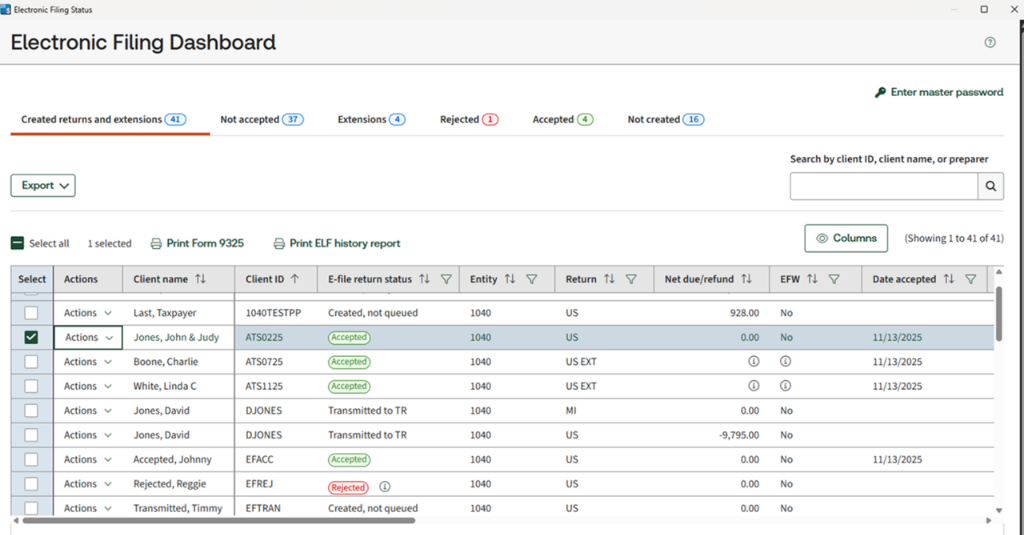
To transmit electronic returns — and 1040, 1120, 1065, 990, or 1041 electronic extensions — follow these steps.

  1. Click the CS Connect button on the UltraTax CS toolbar or choose Utilities > CS Connect to open the CS Connect dialog.
  2. In the Options tab, click the Electronic Filing: ($) Transmit returns switch to set it to “Yes.”
  3. Click the Electronic Filing tab to view a list of electronic returns ready for transmission.
  4. In the “Clients available to transmit” pane, highlight the clients whose returns you want to transmit during the next CS Connect session and click the Select button. The selected clients move to the “Clients queued to transmit” pane.
  5. After all the returns you want to transmit are listed in the “Clients queued to transmit” pane, click the Options tab. The selected returns are now queued and ready for transmission to us using CS Connect.
  6. Click the Connect button. You will be prompted to verify your login via the Thomson Reuters Authenticator app on the mobile device you paired with your account. After you confirm your credentials, UltraTax CS will transmit the returns listed in the “Clients queued to transmit” pane in the Electronic Filing tab.

To get acclimated using UltraTax CS, we provide training through written documentation, videos, and virtual or on-premise expert instruction customized for your firm’s specific needs. We can give you a thorough overview of the latest best practices in the profession and help you make the most of your investment in UltraTax CS.

UltraTax CS is a part of the CS Professional Suite and integrates seamlessly with all CS products, including Accounting CS, Accounting Payroll CS, Practice CS, and more.

Using advanced data sharing, paperless processing, and the web, our full suite of top-rated, integrated products combines and shares data to create a customizable solution that will save time and boost productivity. Companies using UltraTax CS report over 50% time savings because of CS Professional Suite data integration.

Get answers to your questions through phone, e-mail or chat, as well as 24-hour access to our state-of-the-art help and support Center with thousands of articles and content.

Ready to Learn More About Thomson Reuters UltraTax CS?